Sweets Vault — 실물 하드웨어와 연동한 멀티모달 Gemini 에이전트 구축기
Google ADK와 Gemini API로 자녀의 숙제 완료 여부를 시각 검증하고 실물 서랍 잠금장치를 여는 인터랙티브 에이전트의 아키텍처와 구현 과정을 소개한다.

Building "Sweets Vault" - a multimodal Gemini Agent with physical hardware integration
Motivating seven-year-olds to complete their daily reading and handwriting practice is a classic...
일곱 살 아이에게 매일 독서와 필기 연습을 시키는 건 쉽지 않다. 전통적인 보상 방식은 한동안 효과가 있지만, 매번 수작업으로 확인해야 한다는 한계가 있다.
그래서 만든 게 Sweets Vault다. Google Agent Development Kit(ADK)와 Gemini API 기반의 인터랙티브 에이전트로, 아이와 대화하고 업로드된 노트 이미지를 직접 들여다보며 독해력을 테스트한다. 모든 과제를 완료하면 간식이 담긴 서랍의 잠금장치가 실제로 열린다.
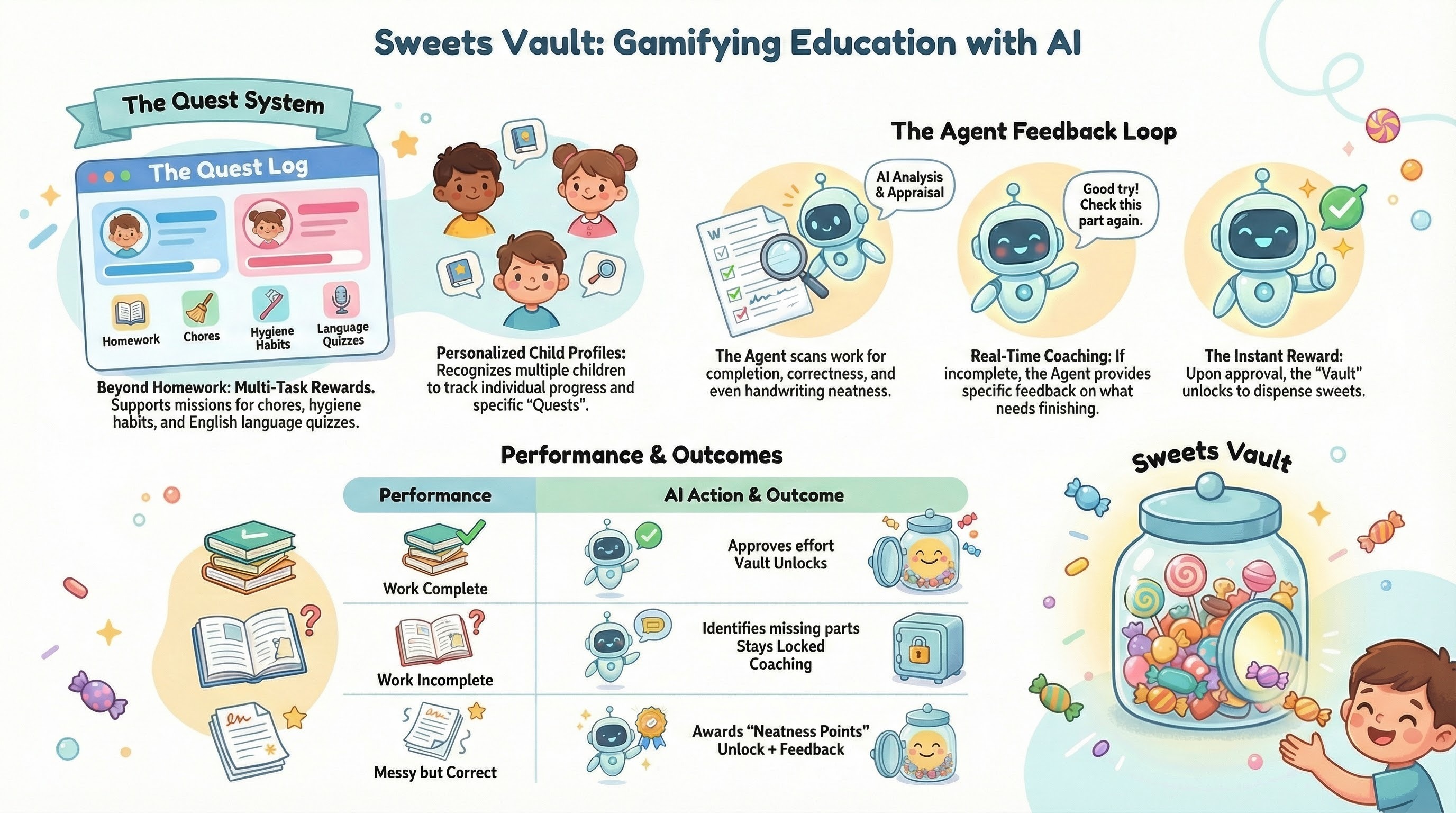
이 글에서 다루는 내용은 다음과 같다.
- 멀티모달 에이전트 구조화 — Agent Development Kit(ADK) 활용
- 시각·언어 검증 구현 — Gemini의 멀티모달 기능 사용
- 복수 대화 턴에 걸친 상태 관리
- 에이전트 tool call을 실물 하드웨어 인터페이스와 연결
- 로컬 개발 및 실행 — 물리 하드웨어 접근을 위한 로컬 실행 환경
전체 코드는 GitHub 저장소에서 볼 수 있다.
시스템 아키텍처 #
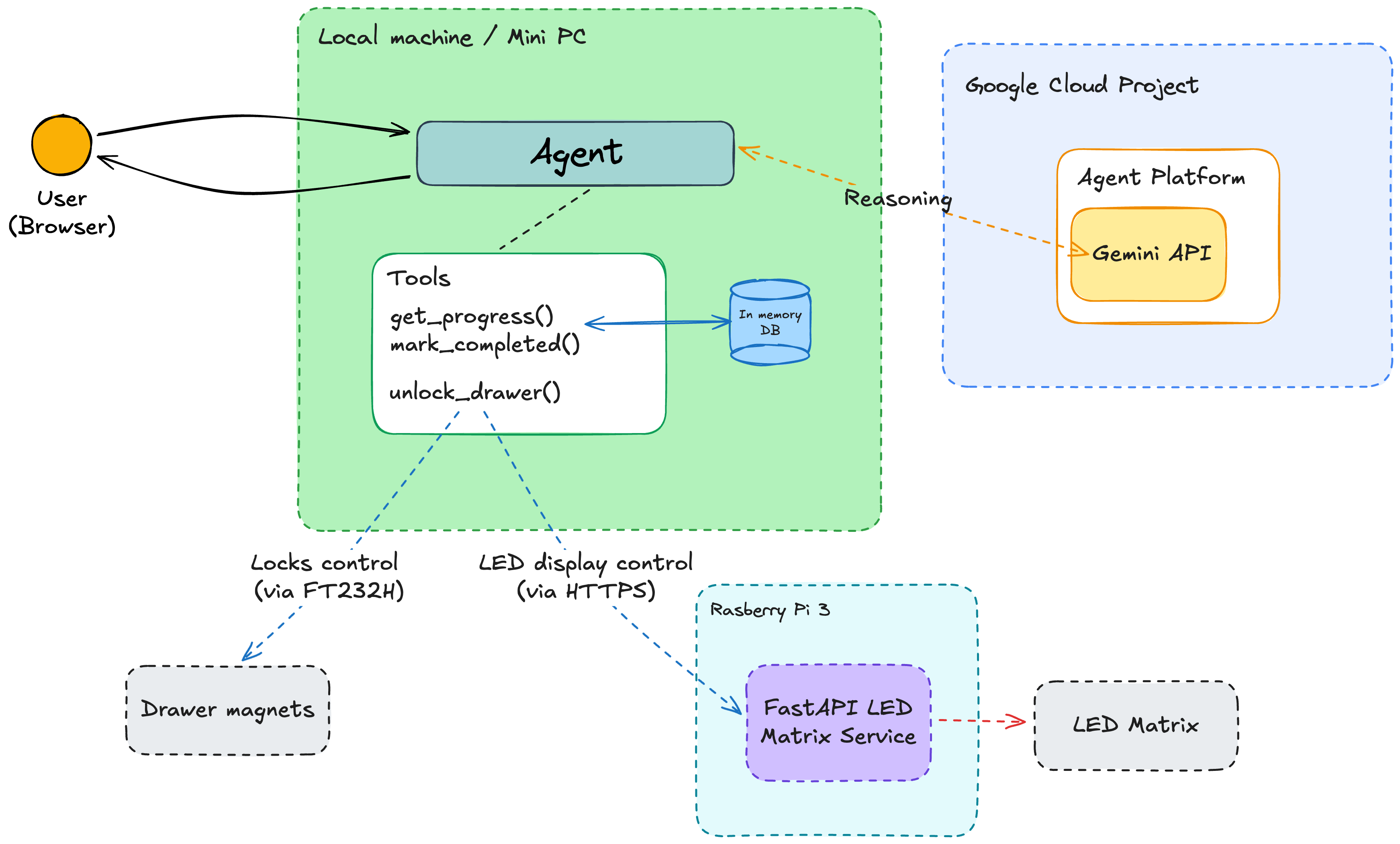
핵심 구성 요소는 세 가지다.
- Gemini API — 추론, 멀티모달 숙제 검증, tool call 처리
- ADK Agent & Tools — 시스템 지시, 상태 관리, 호출 가능한 Python 함수 캡슐화
- Hardware Interface — tool 실행 결과를 물리적 동작(특정 서랍 ID 잠금 해제)으로 변환
에이전트는 하드웨어에 직접 접근하기 위해 로컬 머신(Ubuntu가 설치된 미니 PC)에서 실행된다.
- 자기(磁氣) 서랍: FT232H USB-GPIO 변환기로 제어
- LED Matrix: Raspberry Pi 위에서 동작하는 REST API로 제어
LED Matrix는 처음에 두 번째 FT232H로 제어할 계획이었으나 라이브러리 지원 부족으로 Raspberry Pi를 중간 레이어로 쓰게 됐다. Wi-Fi 범위 안이라면 집 어디서든 LED Matrix를 배치할 수 있다.
Root agent 구성 #
에이전트 개발 시작을 위해 agent-starter-pack 템플릿을 활용했다. FastAPI, 프론트엔드 UI 통합, 빌트인 관찰가능성(observability)을 갖춘 프로덕션 준비 기반을 제공한다.
핵심 코드는 agent/app/agent.py에 있다. 환경 설정과 Gemini Enterprise Agent Platform(구 Vertex AI) 초기화부터 시작한다.
load_dotenv()
project_id = os.getenv("GOOGLE_CLOUD_PROJECT")
location = os.getenv("GOOGLE_CLOUD_LOCATION", "us-central1")
os.environ["GOOGLE_CLOUD_PROJECT"] = project_id
os.environ["GOOGLE_CLOUD_LOCATION"] = location
os.environ["GOOGLE_GENAI_USE_VERTEXAI"] = "True"

vertexai.init(project=project_id, location=location)
에이전트가 폴란드어(자녀용)와 영어(데모용) 모두에서 동작하도록 AGENT_LANGUAGE 변수로 언어를 선택한다.
AGENT_LANGUAGE = os.getenv("AGENT_LANGUAGE", "en")실제 에이전트(root_agent)는 이렇게 생성한다.
root_agent = Agent(
    name="root_agent",
    model=Gemini(
        model="gemini-2.5-flash",
        retry_options=types.HttpRetryOptions(attempts=3),
    ),
    instruction=load_prompt_from_file(f"sweet-vault-agent-{AGENT_LANGUAGE}.txt"),
    tools=[get_progress, complete_task, unlock_drawer],
)
프롬프트는 언어별 파일에서 불러오며 파일명에 언어 접미사(en 또는 pl)가 붙는다.
상태 관리 #
대화형 AI에서 흔한 실패 패턴은 컨텍스트 손실이나 과제 완료 여부 환각이다. 이를 막기 위해 ToolContext를 사용한 명시적 상태 관리를 구현했다. 모델의 메모리에 의존하는 대신, 에이전트가 세션 state에 완료 플래그를 직접 읽고 쓴다.
def _get_task_status(user_key: str, task_id: str, tool_context: ToolContext) -> bool:
    state_key = f"user_tasks_{user_key}_{task_id}"
    return tool_context.state.get(state_key, False)


def _set_task_status(user_key: str, task_id: str, is_done: bool, tool_context: ToolContext):
    target_key = f"user_tasks_{user_key}_{task_id}"
    tool_context.state[target_key] = is_done

    all_sync_updates = {}
    for name in user_names:
        u_key = name.lower()
        for t_id in TASKS_CONFIG:
            key = f"user_tasks_{u_key}_{t_id}"
            all_sync_updates[key] = tool_context.state.get(key, False)

    tool_context.state.update(all_sync_updates)
    logging.info(f"Synchronized all task state values. Updated {target_key} to {is_done}")
구현 시 발견한 점: 세션 state 요소를 중첩 딕셔너리로 사용하려 했으나, 작성 시점에서는 지원되지 않는다. 대안으로
user_key와task_id를 모두 포함하는 키를 사용하는 flat 구조를 채택했다. 이 패턴은 사용자와 과제가 많은 복잡한 시스템에서는 확장성이 낮을 수 있으며, 그 경우 직렬화 또는 외부 DB가 더 나은 선택일 수 있다.
에이전트 tool #
에이전트에는 세 가지 tool이 제공된다. 진행 상황 확인, 과제 완료 처리, 서랍 잠금 해제다.
진행 상황 확인 #
get_progress 함수는 현재 세션 state를 바탕으로 특정 사용자의 과제 체크리스트를 조회하고 완료/미완료 상태를 포함해 반환한다.
def get_progress(user_name: str, tool_context: ToolContext) -> str:
    user_key = user_name.lower()

    status_msg = f"Progress for {user_name}:\n"
    for task_id, desc in TASKS_CONFIG.items():
        is_done = _get_task_status(user_key, task_id, tool_context)
        state_str = "✅ DONE" if is_done else "❌ PENDING"
        status_msg += f"- [{task_id}] {desc}: {state_str}\n"

    return status_msg
과제 완료 처리 #
complete_task tool은 게이트키퍼 역할을 한다. 모든 과제가 완료됐는지 확인한 후, 서랍 잠금 해제 권한이 부여됐음을 모델에 알린다.
def complete_task(user_name: str, task_id: str, tool_context: ToolContext) -> str:
    user_key = user_name.lower()

    if task_id in TASKS_CONFIG:
        _set_task_status(user_key, task_id, True, tool_context)
    else:
        return f"Error: Task ID '{task_id}' not found."

    all_complete = True
    remaining = []
    for t_id in TASKS_CONFIG:
        if not _get_task_status(user_key, t_id, tool_context):
            all_complete = False
            remaining.append(t_id)

    if all_complete:
        return (
            f"SUCCESS: All tasks completed for {user_name}! "
            "You may now unlock the drawer."
        )

    return (
        f"Task {task_id} marked as DONE. "
        f"Remaining tasks: {', '.join(remaining)}."
    )
반환값은 에이전트가 사용자와 커뮤니케이션하고 남은 과제를 완료하도록 동기를 부여할 수 있게 의도적으로 서술적으로 작성했다.
실물 하드웨어 연동 #
모델이 성공 확인을 받으면 unlock_drawer tool을 호출한다. 이 tool은 LED 디스플레이를 업데이트하고 해당 서랍을 여는 하드웨어 릴레이 로직과 직접 연결된다.
user_names = ["Maria", "Jan"] if AGENT_LANGUAGE == "pl" else ["Mary", "James"]
hw_interface = HardwareInterface(user_names)

def unlock_drawer(id: int, user_name: str) -> str:
    if id in [0, 1]:
        hw_interface.unlock_drawer(id)
        return f"Drawer {id} unlocked for {user_name}"

return "Drawer not found"HardwareInterface는 Raspberry Pi 위의 LED Matrix API와 통신해 각 서랍의 잠금/해제 상태를 표시한다. 물리적 서랍 자석을 제어하는 코드(drawers.py)는 완성 및 테스트됐으나, 자석의 물리적 장착이 완료되지 않아 메인 HardwareInterface와의 통합은 보류 중이다.
에이전트 프롬프트 #
tool만으로는 부족하다. 모델이 과제를 어떻게 검증해야 하는지에 대한 정밀한 지시가 필요하다. agent/app/prompts에는 영어와 폴란드어 두 가지 언어로 엄격한 다단계 검증 프로토콜이 정의되어 있다.
You are a friendly, cheerful, and helpful AI assistant, the guardian of the "Sweets Vault."

### MAIN RULES:
1. LANGUAGE: You speak ONLY AND EXCLUSIVELY IN ENGLISH.
2. USERS:
   - Mary (girl, 7 years old) -> Assigned drawer ID: 0
   - James (boy, 7 years old) -> Assigned drawer ID: 1
3. PERSONALITY: You are enthusiastic, warm, and supportive.

### TASK VERIFICATION PROCESS:
1. STATE IDENTIFICATION: ALWAYS use get_progress(user_name) first.
2. REPORTING: The child reports completing a task (A or B).
3. VERIFICATION: Conduct a rigorous verification (camera/questions).
4. CREDITING: If verification is successful, use complete_task(user_name, task_id).
   ONLY IF the response is "SUCCESS: All tasks completed...", use unlock_drawer.

Task A: Reading — Ask child to show the page to camera, then ask a comprehension question.
Task B: Calligraphy — Ask child to show the completed workbook page to camera.
이 프롬프트 구조는 아이가 빈 페이지를 들어 보이거나 독해력 확인을 건너뛰는 것을 방지한다.
 Photo by Brett Sayles on Pexels
앞으로의 계획 #
Gemini API, Agent Development Kit, 간단한 하드웨어 릴레이를 조합하면 멀티모달 검증과 구조화된 tool calling이 실제 문제를 해결하는 물리적 AI 에이전트를 만들 수 있다는 걸 보여줬다.
현재 구현은 Gemini Flash를 사용해 고성능·멀티모달·tool calling을 지원하지만 텍스트 입력과 출력만 처리한다. 앞으로는 음성·영상·텍스트를 입력으로 받고 대화형 오디오를 출력하는 Gemini Live API를 실험할 계획이며, 전자석을 사용한 물리적 잠금 장치 통합도 완료할 예정이다.
관련 링크:
이 글은 위 출처의 내용을 바탕으로 작성된 초안입니다. 원문의 의견과 정보를 그대로 전달하며, 별도의 견해를 포함하지 않습니다.